
What it does
Your voice, every time
How you sound, the words you like, the words you never use, and how the tone changes on a bad night. It goes into every draft, not just the ones that happen to match a document.
A four-level safety net
Routine reviews are drafted. Service failures are drafted and routed. Illness, injury, discrimination or theft are held with a neutral acknowledgment until a manager clears them. Threats, legal action or a data breach are never drafted at all.
Never-say rules with teeth
No refund promises, no naming staff, no medical assurances, no asking a guest to edit a review. A draft that slips is rewritten before you see it.
The right person, with a note
Each complaint is matched to the department that owns it. The owner gets a short internal note: what happened, what evidence to gather, and when it is due.
Import the manual you already have
Paste a brand doc, upload an SOP or a response manual, or fill in our template. FeedbackRobot sorts it into voice, rules, escalation and departments for you to check before anything is saved.
Facts stay in Documents
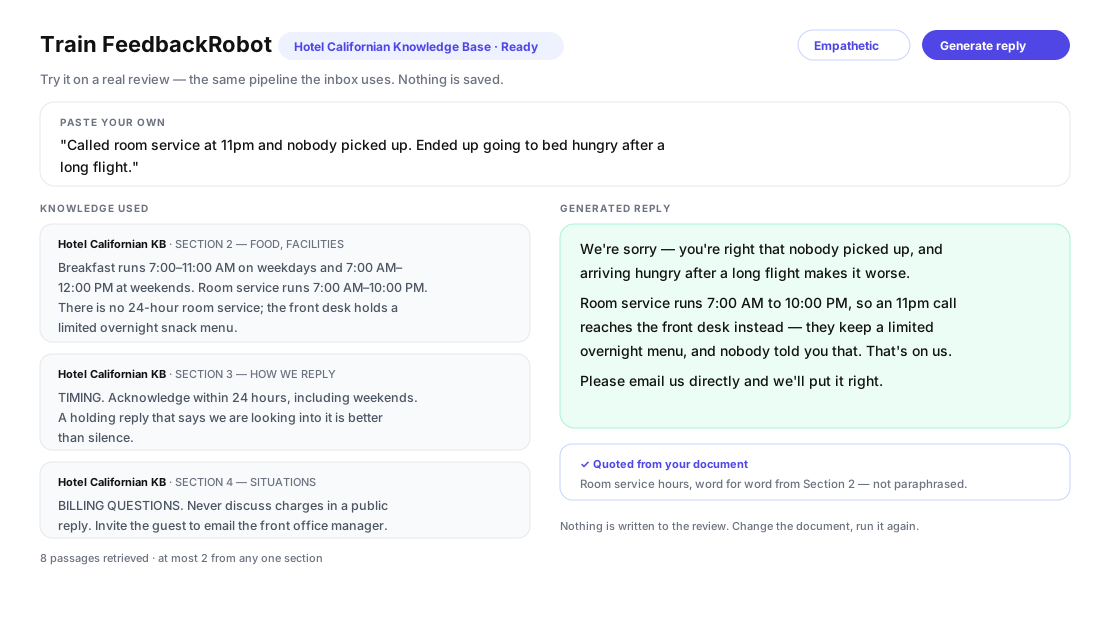
Hours, policies and what a room includes are looked up by topic when a guest mentions them. Rules apply everywhere; facts apply where they are relevant. You get both.
How it works
-
1
Train it: eight short questions, or import the manual you already have.
-
2
Every new review and survey answer is sorted into four levels before a draft exists.
-
3
Routine and recoverable ones are drafted in your voice; serious ones wait for a person, with the note already written.
Inside the product
What it looks like in FeedbackRobot
The difference it makes
A guest writes that her husband got sick after dinner and nobody from management called. Untrained, an AI drafts a sorry-to-hear-that reply and a busy manager posts it. Trained, FeedbackRobot recognises an illness allegation, holds the reply, emails the GM and the restaurant lead, and writes the note staff need: what happened, which department, what evidence to gather, and when it is due. The public reply waits for a person. That is the difference between a tool that writes and a tool that knows when not to.
Untrained
"We're so sorry to hear about your experience. This is not the level of service we aim for. Please reach out so we can make it right."
Trained · held for a manager
Level 3 · Food & beverage · GM and restaurant lead emailed · Internal note: illness allegation after dinner, no management follow-up; pull the reservation, the dish and the kitchen log; due in 24 hours.
Ten minutes to train it
Train FeedbackRobot asks eight short questions: how you sound, the words you like and avoid, how the tone changes on a negative review, two example replies, what you never say, who is told when a review is serious, and who owns what. Each step saves as you go. Skip any of them and FeedbackRobot’s defaults apply until you come back.
Already have a manual? Paste it, upload it, or fill in the training template. FeedbackRobot reads it once and shows what it found, section by section, before anything is saved.
Four levels, one rule: serious means a person
Every new review and survey answer is sorted before a draft exists.
- Routine — praise, suggestions, small preferences. Drafted in your voice.
- Service recovery — slow service, cleanliness, noise, billing. Drafted, and the owning department gets the note and a due date.
- Urgent — illness, injury, discrimination, theft, privacy. Held with a neutral acknowledgment until a manager clears it. Contacts are emailed.
- Critical — violence, legal threats, data breach. Nothing is drafted. Contacts and the group’s owners are emailed at once.
A short list of phrases forces at least Urgent whatever the model thinks, and you can add your own. Levels only ever go up, never down.
Groups
Rules, escalation and departments live at the top of a group and apply everywhere. Each hotel holds its brand voice; each outlet its own. Override any section on a single workspace, and switch it back with one click.
Where the training applies
Training shapes review replies and AI resolutions alike. Facts such as hours, policies and what a room includes live in the Documents tab, looked up by topic when a guest mentions them. Rules apply everywhere; facts apply where they are relevant.
Frequently asked questions
What does Training change?
Once a workspace is trained, every new review and survey answer is sorted into one of four risk levels before a draft exists, every draft is written in your voice with your rules, and serious items are held for a person with an internal note already written.
What are the four levels?
Routine reviews are drafted. Service failures are drafted and routed to the owning department. Urgent ones such as illness, injury, discrimination or theft are held with a neutral acknowledgment until a manager clears them. Critical ones such as violence, legal threats or a data breach are never drafted and your contacts are alerted at once.
Can I import the manual we already use?
Yes. Paste it, upload it, or fill in the training template. FeedbackRobot reads it once and shows what it found so you can check it before anything is saved.
Does it work for a group with several venues?
Yes. Rules, escalation and departments live at the group level and apply everywhere. Each hotel holds its brand voice and each outlet its own. Any section can be overridden on a single workspace.
What about facts like our hours and policies?
Those live in the Documents tab, where they are looked up by topic when a guest mentions them. Training holds the voice and the rules that apply to every reply.
Is anything posted automatically?
No. Every reply is a draft a person approves. Held and blocked items cannot be approved at all until a manager clears them.
Setup takes 3 minutes. Your agent handles the rest.
Get Started — 25 Free AI Actions